Learn how businesses can set up a secure VPN for remote employees using WireGuard, VPN routers, GL.iNet Flint 2, Flint 3, Slate 7, MikroTik, UniFi, ASUS, and other reliable solutions.
Introduction
Remote work is now common for small businesses, offices, consultants, agencies, and support teams. Employees may work from home, hotels, client sites, airports, or shared internet connections. This flexibility is useful, but it also creates serious security risks.
When employees connect from public Wi-Fi or unknown networks, business data can be exposed. They may need access to office files, internal systems, printers, servers, remote desktops, NAS storage, cameras, or business applications. Without a secure VPN, this access can become unsafe, unreliable, or difficult to manage.
A secure VPN helps remote employees connect to the business network through an encrypted tunnel. This means their traffic is protected, and they can safely access approved business resources from outside the office.
This guide explains how to set up a secure VPN for remote employees in a simple and practical way.
What Is a VPN for Remote Employees?
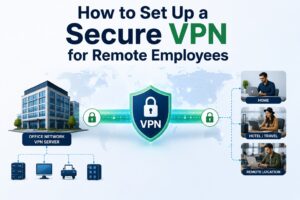
A VPN, or Virtual Private Network, creates a secure encrypted connection between a remote employee and the company network.
For example, an employee working from a hotel can connect to the company VPN and safely access internal business systems as if they were connected from the office network.
A business VPN is different from a normal commercial VPN app. A commercial VPN is usually used for privacy or changing location. A business VPN is used for secure access to company resources.
For remote work, the best setup is usually a private VPN server on your own router, firewall, cloud server, or office gateway. This gives the business more control over who connects, what they can access, and how the connection is protected.
Why Businesses Need a Secure VPN
Many businesses wait until something goes wrong before setting up a VPN. Common problems include:
- Employees using public Wi-Fi without protection
- Remote staff unable to access office systems
- File sharing through unsafe methods
- Weak router passwords or open ports
- Remote desktop exposed directly to the internet
- DNS leaks while connected remotely
- Slow or unstable remote connections
- No control over which employees can access internal resources
A secure VPN solves many of these problems by creating a controlled and encrypted path between the remote user and the business network.
Best VPN Protocol for Remote Employees
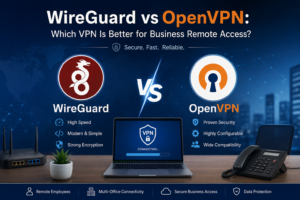
For most modern remote work setups, WireGuard is one of the best VPN protocols. It is fast, lightweight, secure, and easier to manage compared to many older VPN protocols.
Other options include OpenVPN and IPsec. These are still useful in some environments, especially when a company already uses specific firewalls or enterprise systems. However, for many small and medium businesses, WireGuard is a great choice because it offers strong performance with simpler configuration.
Recommended VPN protocol order:
- WireGuard – Best for speed, simplicity, and modern remote work
- OpenVPN – Good compatibility, but usually slower than WireGuard
- IPsec/IKEv2 – Good for enterprise environments and mobile devices
- L2TP/PPTP – Avoid for new business VPN setups
For most small businesses, remote teams, and router-based VPN setups, WireGuard is usually the best starting point.
Main VPN Setup Options
There are different ways to set up a VPN for remote employees. The best option depends on your business size, number of users, internet speed, and equipment.
1. Office Router as VPN Server
This is one of the most common setups.
The office router or firewall works as the VPN server. Remote employees connect to it using a laptop, phone, or travel router.
This setup is good for:
- Small offices
- Remote employees
- Accessing office printers, NAS, servers, or internal apps
- Businesses that want control over their own VPN
Recommended devices for this setup include GL.iNet Flint 2, GL.iNet Flint 3, MikroTik, UniFi Cloud Gateway, ASUS VPN routers, pfSense, and Fortinet.
2. Travel Router as VPN Client
A travel router is useful for remote employees who work from hotels, apartments, shared offices, or abroad.
Instead of installing VPN on every device, the employee connects their laptop, phone, or work device to the travel router. The travel router then sends traffic through the VPN tunnel.
This is very useful when:
- The employee travels often
- The work laptop should always use VPN
- Multiple devices need to connect through one secure VPN tunnel
- The employee wants a stable private Wi-Fi network while traveling
The GL.iNet Slate 7 is a strong recommendation for this use case because it is portable, supports WireGuard and OpenVPN, and is designed for travel and remote work.
3. Firewall-Based VPN
For bigger offices or businesses with more advanced security needs, a firewall-based VPN is better.
Examples include:
- Fortinet FortiGate
- pfSense or Netgate
- UniFi Gateway
- MikroTik RouterOS
- Cisco or Meraki solutions
This option is best when the business needs user policies, VLAN separation, firewall rules, monitoring, and stronger access control.
4. Cloud VPN Server
A cloud VPN server can be useful if the company does not have a fixed office location or wants remote employees to connect through a cloud network.
This can be set up on platforms like AWS, Azure, DigitalOcean, or a private VPS. However, it needs proper firewall rules, updates, monitoring, and security hardening.
For many small businesses, a router-based VPN is easier to manage than a cloud VPN server.
Recommended VPN Router Setup for Remote Employees
A reliable VPN setup usually has two sides:
Office side: VPN server router
Remote side: VPN client device or travel router
A good example setup:
- Office router: GL.iNet Flint 2 or Flint 3
- Remote employee router: GL.iNet Slate 7
- VPN protocol: WireGuard
- Security: Strong keys, firewall rules, DNS leak protection, and limited access
This setup is useful for remote workers who need secure access to office resources from home, hotels, or international locations.
Recommended VPN Routers
GL.iNet Flint 2
The GL.iNet Flint 2 is a strong choice for a home office, small office, or remote work VPN server. It supports WireGuard and OpenVPN and is suitable for high-speed VPN connections.
Best for:
- Small business VPN server
- Home office VPN server
- Remote access to office devices
- Users who need strong WireGuard performance
- Businesses that want a simple router-based VPN setup
Flint 2 is a good recommendation when VPN speed is a major priority.
GL.iNet Flint 3
The GL.iNet Flint 3 is a Wi-Fi 7 router with modern wireless features and VPN support. It is useful for users who want newer Wi-Fi technology, multiple devices, and a more future-ready router.
Best for:
- Modern home office
- Small business office
- Wi-Fi 7 environments
- VPN server or VPN client use
- Users who want advanced Wi-Fi features with VPN support
Flint 3 is a good option when Wi-Fi 7, newer hardware, and advanced wireless features are important.
GL.iNet Slate 7
The GL.iNet Slate 7 is a portable travel router. It is recommended for remote employees, business travelers, consultants, and users who work from hotels or temporary locations.
Best for:
- Traveling employees
- Remote work from hotels
- Secure public Wi-Fi use
- Connecting multiple work devices through one VPN
- Using a private Wi-Fi network while away from home or office
A common setup is to use Flint 2 or Flint 3 as the VPN server and Slate 7 as the travel VPN client.
MikroTik Routers
MikroTik is a powerful option for technical users and businesses that need advanced routing, firewall rules, VLANs, bandwidth control, and VPN customization.
Best for:
- Advanced network control
- ISPs and technical teams
- Businesses needing VLAN and firewall policies
- Site-to-site VPN
- Custom WireGuard setups
MikroTik is powerful, but it should be configured carefully because wrong firewall or VPN settings can create security risks.
UniFi Gateway
UniFi is a good option for businesses already using Ubiquiti access points, switches, and cloud gateways. It provides a clean dashboard and supports remote access VPN features.
Best for:
- Offices using UniFi network equipment
- Businesses wanting centralized management
- Small to medium offices
- Clean monitoring and user-friendly interface
UniFi is often a good choice when the business wants professional networking with easier management.
ASUS VPN Routers
Some ASUS routers support VPN server and VPN client features, including WireGuard on supported models and firmware versions.
Best for:
- Home office users
- Small remote teams
- Users who want a simpler interface
- Basic VPN server or VPN client setup
ASUS can be a good option for simple remote access, but businesses should confirm the exact model supports the required VPN feature before buying.
pfSense or Netgate
pfSense is a strong firewall and routing platform for businesses that need more control.
Best for:
- Advanced firewall rules
- Multi-WAN
- VLANs
- Site-to-site VPN
- Business-grade network security
pfSense is powerful, but it usually needs more technical knowledge to set up and maintain properly.
Secure VPN Setup Checklist
A VPN should not be installed quickly without planning. A weak VPN setup can still expose your business.
Use this checklist before setting up VPN access.
1. Choose the Right VPN Protocol
Use WireGuard where possible. It is fast, modern, and suitable for most remote employees.
OpenVPN can also be used if WireGuard is not supported by the router or firewall.
2. Use a Strong VPN Router or Firewall
The router must be powerful enough to handle encrypted VPN traffic. A low-performance router can reduce VPN speed and cause video calls, file transfers, and remote desktop sessions to lag.
For small business and remote work setups, GL.iNet Flint 2, Flint 3, Slate 7, MikroTik, UniFi, ASUS, and pfSense are practical options depending on the requirement.
3. Avoid Exposing Remote Desktop Directly
Never expose Windows Remote Desktop, NAS login pages, router admin panels, or internal servers directly to the internet.
Instead, keep them inside the private network and allow access only through the VPN.
4. Use Strong Authentication
Every employee should have their own VPN profile or key. Do not share one VPN profile with all employees.
This makes it easier to remove access when someone leaves the company or changes role.
5. Limit Access by Role
Not every employee needs access to the full network.
For example:
- Accounting staff may only need access to accounting software
- Support staff may only need access to helpdesk tools
- Admin users may need access to servers
- Guests should not access internal systems
A secure VPN setup should include firewall rules and access control.
6. Configure DNS Properly
DNS is very important for privacy and security. Poor DNS configuration can cause DNS leaks or prevent internal business systems from resolving correctly.
A good setup should make sure:
- Internal resources resolve correctly
- DNS traffic goes through the VPN where required
- Public DNS leaks are tested
- Employees do not bypass company DNS accidentally
7. Enable Kill Switch Where Needed
A kill switch blocks internet traffic if the VPN disconnects. This is useful for remote employees who must always stay connected through the business VPN.
Travel routers like GL.iNet devices can be configured to help prevent traffic from leaking outside the VPN tunnel.
8. Keep Router Firmware Updated
VPN routers and firewalls should be updated regularly. Updates fix bugs, improve performance, and patch security issues.
Do not leave business VPN equipment running old firmware for years without review.
9. Test the VPN Before Giving It to Employees
Before handing over the VPN to staff, test:
- Public IP location
- DNS leak
- Internal server access
- Remote desktop access
- Printer or NAS access
- Video call performance
- File upload and download speed
- VPN reconnect after internet drop
Testing is important because a VPN may connect successfully but still have DNS, routing, or access issues.
10. Prepare a Simple User Guide
Employees should receive a simple guide explaining:
- How to connect to the VPN
- Which Wi-Fi network to use
- What to check if VPN is not connecting
- Who to contact for support
- What not to do, such as disabling VPN while working
A clear guide reduces support requests and avoids mistakes.
Common VPN Problems Businesses Face
VPN Connects but Internet Is Slow
This can happen because of weak upload speed at the office, poor router CPU performance, long distance between employee and office, or overloaded Wi-Fi.
Solution: Test office upload speed, use WireGuard, use a better VPN router, and avoid weak hotel Wi-Fi when possible.
VPN Connects but Office Devices Do Not Open
This is usually a routing, firewall, or DNS issue.
Solution: Check allowed IPs, firewall rules, VPN subnet, LAN subnet, and DNS configuration.
VPN Disconnects Again and Again
This can happen due to unstable internet, double NAT, wrong port forwarding, or weak Wi-Fi.
Solution: Use Ethernet where possible, check ISP router port forwarding, enable DDNS, and test with another internet connection.
DNS Leak During VPN Use
A DNS leak means the device may still use local or public DNS instead of the secure VPN DNS.
Solution: Push DNS through the VPN, test with a DNS leak tool, and use firewall rules to block unwanted DNS traffic.
Multiple Employees Use the Same VPN Profile
This is not secure. If one employee leaves, you cannot easily remove only that person’s access.
Solution: Create a separate VPN profile or key for each employee.
Best Setup for Small Businesses
For many small businesses, the best secure VPN setup is:
- WireGuard VPN
- Office VPN router or firewall
- Separate VPN profile for each employee
- DNS leak protection
- Firewall rules to limit access
- Remote router or travel router for employees who travel
- Monthly monitoring and support
A practical hardware combination is:
Office Side: GL.iNet Flint 2 or Flint 3
Travel Side: GL.iNet Slate 7
Protocol: WireGuard
Use Case: Secure remote access for employees working from home, hotels, or abroad
This setup is simple, cost-effective, and suitable for many small business remote work needs.
When Should You Use a Travel Router?
A travel router is recommended when the employee needs a stable and secure setup outside the office.
Use a travel router if:
- The employee travels often
- The work laptop must always use VPN
- The employee connects from hotels or public Wi-Fi
- Multiple devices need secure access
- The business wants a repeatable remote work setup
- The employee is not technical and needs a simple on/off VPN solution
For this, GL.iNet Slate 7 is a strong choice. It can connect to Ethernet, Wi-Fi repeater mode, tethering, and VPN. This makes it useful for remote workers who move between locations.
Security Mistakes to Avoid
Avoid these common mistakes:
- Using weak router admin passwords
- Sharing one VPN profile with all employees
- Exposing remote desktop directly to the internet
- Ignoring firmware updates
- Using old VPN protocols
- Not testing DNS leaks
- Allowing VPN users to access the full network without limits
- Buying a router without checking VPN performance
- Setting up VPN without backup access or documentation
A VPN is only secure when it is designed, configured, and tested properly.
Final Thoughts
A secure VPN is one of the best ways to protect remote employees and business data. It allows staff to work from home, hotels, client sites, or abroad while safely accessing approved company resources.
For many businesses, WireGuard with a reliable VPN router is the best option. GL.iNet Flint 2, Flint 3, and Slate 7 are excellent choices for small business and travel-based VPN setups. Other strong options include MikroTik, UniFi, ASUS, pfSense, and Fortinet depending on the business size and security requirements.
The most important thing is not just connecting the VPN. The VPN must be secure, tested, and designed around real business needs.
Need Help Setting Up a Secure VPN?
Ahmad Networks provides professional VPN setup, secure remote access, router configuration, Wi-Fi optimization, firewall setup, and remote IT support for businesses, remote teams, offices, hotels, campuses, and small to medium enterprises.
Whether you need a WireGuard VPN, GL.iNet router setup, travel router configuration, DNS leak protection, firewall rules, or monthly network support, Ahmad Networks can help you build a secure and reliable remote work solution.
Book a free consultation today and secure your remote employees with a professional VPN setup.
FAQs
What is the best VPN for remote employees?
WireGuard is one of the best VPN protocols for remote employees because it is fast, secure, and easier to manage than many older VPN options.
Can employees use a VPN from hotels or public Wi-Fi?
Yes. A VPN is highly recommended when employees use hotel Wi-Fi, airport Wi-Fi, cafes, or shared internet connections.
Is a travel router useful for remote work?
Yes. A travel router such as GL.iNet Slate 7 can help remote employees connect multiple devices through one secure VPN tunnel.
Should I use a commercial VPN or my own business VPN?
For business remote access, your own business VPN is usually better because it allows secure access to internal systems, printers, servers, and office resources.
Is WireGuard better than OpenVPN?
In many cases, WireGuard is faster and simpler than OpenVPN. However, OpenVPN is still useful when compatibility is more important than speed.
Can Ahmad Networks set up a VPN remotely?
Yes. Ahmad Networks can remotely configure VPN routers, WireGuard, firewall rules, DNS leak protection, and secure remote access for businesses and remote teams.