Remote work has become a standard part of modern business, but giving employees secure access to company systems from outside the office comes with significant security challenges. Employees may connect from home networks, hotels, airports, coworking spaces, or public Wi-Fi, making it essential for businesses to protect sensitive data and internal resources.
A secure remote access VPN provides an encrypted connection between remote employees and the business network, helping protect company information while allowing authorized users to work from virtually anywhere.
For small businesses, startups, and growing companies, implementing a reliable business VPN solution can be one of the most effective ways to improve remote access security without requiring a complicated enterprise infrastructure.
What Is a Remote Access VPN?
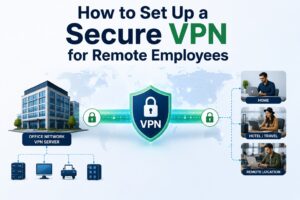
A remote access VPN (Virtual Private Network) creates a secure, encrypted tunnel between a user’s device and a private business network.
Instead of directly exposing internal services such as file servers, applications, network devices, or administrative systems to the public internet, employees connect through the VPN. After authentication, they can access the resources they are authorized to use.
A typical remote access VPN setup includes:
Remote employee → Internet → VPN gateway → Business network → Internal resources
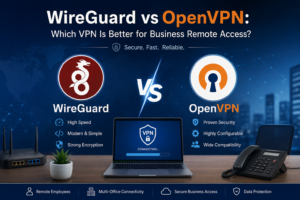
Technologies such as WireGuard, OpenVPN, and IPsec are commonly used to build secure VPN connections.
Why Businesses Need Secure Remote Access
Traditional office networks were designed around the assumption that employees would work from inside the corporate building. Modern businesses are more distributed.
Employees may need to access:
- Company file servers
- Remote desktops
- Internal applications
- Business dashboards
- Network management systems
- Cloud and hybrid infrastructure
- Private databases
- Shared folders and other internal resources
Without a secure remote access solution, businesses may rely on risky approaches such as exposing services directly to the internet or using poorly secured remote-access tools.
A properly configured VPN provides a controlled gateway into the business environment.
1. Protect Sensitive Business Data
Data security is one of the biggest reasons to use a secure remote access VPN.
Remote employees often work with confidential information, including customer records, financial documents, business credentials, intellectual property, and internal communications.
A VPN encrypts traffic between the remote device and the VPN gateway, helping reduce the risk of unauthorized interception while data is transmitted over untrusted networks.
This is especially important when employees connect from public or shared Wi-Fi networks.
2. Secure Employees Working From Anywhere
Modern businesses cannot assume that employees are always working from a secure office network.
A remote worker might connect from:
- Home
- Hotels
- Coffee shops
- Airports
- Coworking spaces
- Client offices
- Temporary workspaces
- International travel
A business VPN allows organizations to apply a consistent secure-access model regardless of where an employee is connecting from.
Instead of trusting the network the employee happens to be using, the business can require the employee to establish a secure VPN connection before accessing protected resources.
3. Control Access to Internal Resources
A VPN should not simply provide unrestricted access to the entire company network.
A properly designed VPN can be combined with authentication, firewall rules, network segmentation, and access policies to control which systems each user can reach.
For example, an employee may need access to a file server but should not have access to network infrastructure or administrative interfaces.
This principle of least-privilege access helps reduce the potential impact of compromised accounts or devices.
4. Reduce Exposure of Internal Services
Exposing internal applications, remote desktop services, management interfaces, and file servers directly to the internet can increase the attack surface of a business.
A more secure architecture can keep sensitive services on private networks and require users to authenticate through the VPN gateway first.
Instead of:
Internet → Internal Application
a business can use:
Internet → VPN Gateway → Authenticated User → Internal Application
This approach can make network access easier to manage while reducing unnecessary public exposure.
5. Improve Security for Remote IT Management
IT administrators often need to manage:
- Routers
- Firewalls
- Servers
- Switches
- Access points
- NAS devices
- Virtual machines
- Internal applications
Allowing these management interfaces to be directly accessible from the internet is generally undesirable.
A remote access VPN can provide administrators with secure access to internal management networks without publishing every administrative service publicly.
For businesses managing multiple locations, VPN access can also simplify centralized administration.
6. Support Hybrid and Remote Teams
Remote work is no longer limited to fully distributed companies.
Many organizations operate hybrid teams where some employees work from the office while others work remotely.
A remote access VPN for business allows remote employees to securely access selected corporate resources while maintaining a consistent network security model.
This can be particularly useful for companies that operate a combination of:
- Office networks
- Remote employees
- Cloud applications
- On-premises servers
- Branch offices
- Travel-based employees
7. WireGuard Can Provide Fast, Modern VPN Connectivity
Businesses have several VPN technologies available, but WireGuard VPN has gained popularity because of its modern cryptography, streamlined design, and performance.
WireGuard can be an excellent option for organizations that need secure remote access without the complexity of some traditional VPN implementations.
For many small and medium-sized businesses, a WireGuard-based VPN can provide:
- Strong encryption
- Fast connection speeds
- Lightweight configuration
- Simple client deployment
- Reliable remote connectivity
However, VPN performance depends on the hardware, internet connection, VPN server, network configuration, encryption overhead, and distance between the user and VPN gateway.
8. VPNs Can Work With Existing Network Hardware
A secure remote access VPN does not always require an expensive enterprise appliance.
Depending on the organization’s requirements, VPN services can be deployed using:
- Business firewalls
- Dedicated VPN appliances
- Linux servers
- Cloud servers
- OpenWrt-based routers
- GL.iNet routers
- pfSense
- Enterprise networking platforms
For smaller companies, a properly configured router or firewall can often provide a practical VPN gateway.
The right solution depends on the number of users, required bandwidth, security requirements, authentication model, and network architecture.
9. Improve Security When Employees Travel
Business travelers frequently connect to unfamiliar networks.
Even when the employee’s device is secure, the network itself may not be trustworthy.
A travel VPN router can provide an additional layer of protection by allowing a user’s devices to connect through a secure VPN tunnel back to a trusted business network.
This can be particularly useful for employees who travel internationally or regularly work from hotels and other temporary locations.
10. Centralize Remote Access Management
Managing remote access through one secure VPN gateway can make network administration easier.
Instead of opening separate firewall ports for every internal application, organizations can establish controlled VPN access and manage authentication centrally.
Administrators can then focus on:
Who can connect → How they authenticate → What they can access → When access is allowed
This makes the remote-access environment easier to monitor and maintain.
Remote Access VPN vs. Direct Internet Access
A simple comparison helps explain why businesses use VPNs.
| Approach | Security | Access Control | Exposure |
| Directly exposed internal services | Higher risk | Limited/varies | High |
| Remote access VPN | Stronger | Centralized | Lower |
| Public Wi-Fi without VPN | Higher risk | None | High |
| VPN over public Wi-Fi | Improved | Controlled | Lower |
A VPN does not automatically make an entire business secure. Security still depends on strong authentication, secure endpoints, correct firewall configuration, software updates, and appropriate access policies.
What Makes a Remote Access VPN Secure?
Simply installing VPN software is not enough.
A secure business VPN should be designed with multiple security controls.
Strong Authentication
Use strong passwords and, where supported, multi-factor authentication or certificate-based authentication.
Modern Encryption
Use reputable VPN protocols and current cryptographic standards. WireGuard, OpenVPN, and IPsec are common choices depending on the environment.
Firewall Rules
Restrict VPN users to only the resources they actually need.
Network Segmentation
Separate critical systems such as servers, management interfaces, employee devices, and guest networks where appropriate.
Regular Updates
Keep VPN gateways, routers, operating systems, and VPN clients updated to supported versions.
Access Monitoring
Monitor authentication activity, unusual connection attempts, and VPN usage where practical.
Secure Endpoint Devices
A secure VPN cannot compensate for an infected or poorly secured laptop. Employee devices should use updated operating systems, endpoint protection, strong authentication, and appropriate security policies.
Common Remote VPN Mistakes Businesses Should Avoid
Businesses sometimes deploy VPNs without considering the underlying network design.
Common mistakes include:
Using Weak Credentials
A VPN account protected by an easily guessed password can become a major security risk.
Giving Everyone Full Network Access
Users should receive access based on their job responsibilities instead of automatically gaining access to the entire network.
Exposing VPN Management Interfaces
Administrative interfaces should be protected and should not be unnecessarily exposed to the public internet.
Ignoring VPN Logs
Authentication failures and unusual connection activity can provide important security signals.
Using Outdated Firmware
VPN gateways and networking devices should be regularly updated to reduce exposure to known vulnerabilities.
Assuming the VPN Solves Everything
VPN encryption protects the connection, but businesses still need endpoint security, identity management, firewall controls, backups, patching, and user awareness.
How to Choose the Right Business VPN
The best VPN solution depends on your organization’s requirements.
Before selecting a platform, consider:
Number of users: How many employees need simultaneous access?
Bandwidth: What applications will users access, and how much traffic will the VPN carry?
Location: Will employees connect from one country or from multiple geographic regions?
Applications: Do users need file sharing, remote desktops, internal websites, databases, or other services?
Authentication: Do you need centralized authentication, certificates, or multi-factor authentication?
Hardware: Can your existing firewall or router handle the required VPN throughput?
Management: Who will monitor and maintain the VPN?
Scalability: Can the design support additional employees and locations as the company grows?
A Practical Remote Access VPN Architecture
A small business could use a structure such as:
Remote Laptop / Phone
↓
Internet
↓
WireGuard / OpenVPN / IPsec VPN Gateway
↓
Firewall Rules & Authentication
↓
Internal Business Network
↓
Servers / Applications / Files
For larger businesses, the architecture may include multiple VPN gateways, identity providers, network segmentation, centralized logging, and additional security controls.
Why Small Businesses Should Not Ignore VPN Security
Cybersecurity is not only a concern for large enterprises.
Small businesses can also hold valuable customer information, financial records, account credentials, proprietary documents, and intellectual property.
A well-designed secure remote access VPN for small business can provide a cost-effective method for protecting remote connections while allowing employees to access internal resources.
The key is not simply having a VPN. The VPN must be correctly designed, securely configured, regularly maintained, and integrated into the company’s overall security strategy.
Final Thoughts
A secure remote access VPN gives businesses a practical way to connect remote employees to internal resources while protecting traffic across untrusted networks.
Whether your company has five remote employees or a distributed workforce across multiple locations, a properly configured VPN can help improve network security, reduce unnecessary internet exposure, and provide controlled access to private business resources.
Modern technologies such as WireGuard, OpenVPN, and IPsec, combined with strong authentication, firewall rules, network segmentation, and secure endpoints, can form a strong foundation for remote business connectivity.
At Ahmad Networks, I help businesses design and configure secure VPN and networking solutions based on their specific requirements, including WireGuard VPN, OpenVPN, IPsec, router VPNs, firewall configuration, remote access VPNs, and business network security.
Need help securing remote access for your business? Contact Ahmad Networks to discuss your VPN and networking requirements.
Frequently Asked Questions
What is a remote access VPN?
A remote access VPN creates an encrypted connection between a remote user’s device and a private business network, allowing authorized users to securely access internal resources over the internet.
Is WireGuard good for business remote access?
Yes. WireGuard can be a strong option for business remote access because of its modern cryptography, simple configuration, and performance. The appropriate VPN technology depends on the organization’s network and security requirements.
Does a VPN protect against all cyberattacks?
No. A VPN primarily secures the network connection. Businesses still need endpoint security, strong authentication, patch management, firewalls, access controls, backups, and other cybersecurity measures.
Can a small business use a VPN?
Yes. Small businesses can implement VPN solutions using suitable routers, firewalls, dedicated VPN appliances, or cloud infrastructure. The solution should be sized according to the number of users and required bandwidth.
Can employees use a business VPN while traveling?
Yes. Employees can use a VPN from hotels, airports, coworking spaces, and other locations. A travel router can also be used to route multiple devices through a secure VPN connection.
How much does a business VPN cost?
The cost depends on the VPN technology, hardware, number of users, bandwidth requirements, cloud infrastructure, and management needs. A small business may be able to implement a VPN using existing networking hardware, while larger organizations may require dedicated infrastructure.